Planet KDE


Hindi Translation of Cantor and KDE Connect - SoK 2024
Kubuntu: Noble Numbat Beta available! Qt6 snaps coming soon.
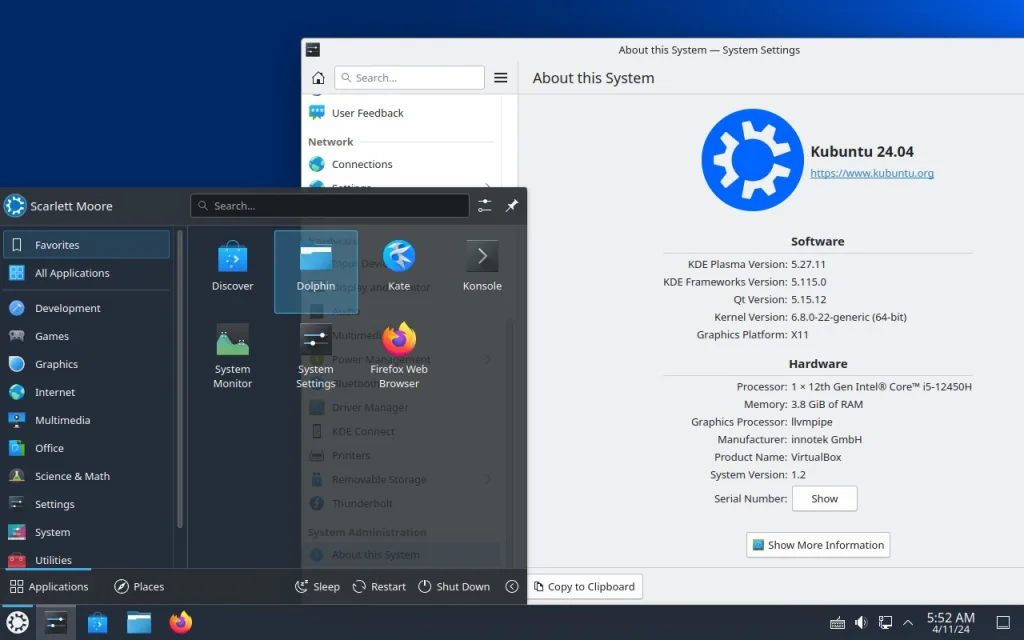
It has been a very busy couple of weeks as we worked against some major transitions and a security fix that required a rebuild of the $world. I am happy to report that against all odds we have a beta release! You can read all about it here: https://kubuntu.org/news/kubuntu-24-04-beta-released/ Post beta freeze I have already begun pushing our fixes for known issues today. A big one being our new branding! Very exciting times in the Kubuntu world.
In the snap world I will be using my free time to start knocking out KDE applications ( not covered by the project ). I have also recruited some help, so you should start seeing these pop up in the edge channel very soon!
Now that we are nearing the release of Noble Numbat, my contract is coming to an end with Kubuntu. If you would like to see Plasma 6 in the next release and in a PPA for Noble, please consider donating to extend my contract at https://kubuntu.org/donate !
On a personal level, I am still looking to help with my grandson and you can find that here: https://www.gofundme.com/f/in-loving-memory-of-william-billy-dean-scalf
Thanks for stopping by,
Scarlett
Kubuntu 24.04 Beta Released

We’re thrilled to announce the availability of the Kubuntu 24.04 Beta! This release is packed with new features and enhancements, and we’re inviting you, our valued community, to join us in fine-tuning this exciting new version. Whether you’re a seasoned tester or new to software testing, your feedback is crucial to making Kubuntu 24.04 the best it can be.
To make your testing journey as easy as pie, we’re introducing a fantastic new tool: KubuQA. Designed with both new and experienced users in mind, KubuQA simplifies the testing process by automating the download, VirtualBox setup, and configuration steps. Now, everyone can participate in testing Kubuntu with ease!
This beta release also debuts our fresh new branding, artwork, and wallpapers—created and chosen by our own community through recent branding and wallpaper contests. These additions reflect the spirit and creativity of the Kubuntu family, and we can’t wait for you to see them.
Get TestingBy participating in the beta testing of Kubuntu 24.04, you’re not just helping improve the software; you’re becoming an integral part of a global community that values open collaboration and innovation. Your contributions help us identify and fix issues, ensuring Kubuntu remains a high-quality, stable, and user-friendly Linux distribution.
The benefits of joining our testing team extend beyond improving the software. You’ll gain valuable experience, meet like-minded individuals, and perhaps discover a new passion in the world of open-source software.
So why wait? Download the Kubuntu 24.04 Beta today, try out KubuQA, or follow our wiki to upgrade and help us make Kubuntu better than ever! Remember, your feedback is the key to our success.
Ready to make an impact?Join us in this exciting phase of development and see your ideas come to life in Kubuntu. Plus, enjoy the satisfaction of knowing that you’ve contributed to a project used by millions around the world. Become a tester today and be part of something big!
Interested in more than testing?By the way, have you thought about becoming a member of the Kubuntu Community? It’s a fantastic way to contribute more actively and help shape the future of Kubuntu. Learn more about joining the community.
Web Review, Week 2024-15
Turns out I managed to squeeze reading here and there and have enough content for a regular review… So let’s go for my web review for the week 2024-15.
Fairbuds are Fairphone’s proof that we really could make better tiny gadgets | Ars TechnicaTags: tech, repair, sound, hardware
Another type of devices where clearly they could be repairable and batteries could be swappable if manufacturers would put care in the design. At least, Fairphone is showing it’s doable.
Tags: tech, gpu, 3d, history
Interesting history behind the company which was instrumental in pushing computer graphics forward during its time.
https://www.abortretry.fail/p/the-rise-and-fall-of-silicon-graphics
Tags: tech, performance, energy, ecology, java, research
More work about eco-design of software. This is definitely welcome. I found this work a bit weak on the state of the art and the interview parts (10 people in the same company). But the field is so nascent that it’s to be expected I guess, PhD students have to do with what they have access to. Unsurprisingly this shows a great lack of proper tools to tackle the measurement problem. This thesis shows interesting prospects to reduce variations in measurements though, some of the proposed guidelines might help but cannot offset the hardware heterogeneity completely… The parts focusing on practical advices around Java use and deployment are interestingly easy to apply though. You need to take into account the context of your application to make the right choices of course.
https://theses.hal.science/tel-03429300/document
Tags: tech, ai, machine-learning, gpt, cognition, criticism, scam
Interesting take on why people see more in LLM based systems than there really is. The parallels with psychics and mentalists tricks are well thought out.
https://softwarecrisis.dev/letters/llmentalist/
Tags: tech, ai, machine-learning, copilot, gpt, programming
All the good reasons why productivity increases with code assistants are massively overestimated. To be used why not, but with a light touch.
Tags: tech, ai, machine-learning, gpt, open-access, research
This is how it should be done. This one comes with everything needed to reproduce the results. This is necessary to gain insights into how such models work internally.
https://blog.allenai.org/hello-olmo-a-truly-open-llm-43f7e7359222
Tags: tech, ai, machine-learning, copilot, programming, architecture
Wondering how one can design a coding assistant? Here is an in depth explanation of the choices made by one of the solutions out there. There’s quite some processing before and after actually running the inference with the LLM.
https://sourcegraph.com/blog/the-lifecycle-of-a-code-ai-completion
Tags: tech, c++
Some interesting insights in this survey. It helps identify common concerns.
https://isocpp.org/blog/2024/04/results-summary-2024-annual-cpp-developer-survey-lite
Tags: tech, cloud, infrastructure, cost
When you do the math, the cloud offerings look very expensive for most workload indeed.
https://thmsmlr.com/cheap-infra
Tags: tech, hardware, homelab, self-hosting
Considering using a server rack for a homelab? This is a nice tutorial with plenty of advices.
https://mtlynch.io/building-first-homelab-rack/
Tags: tech, cryptography, tls, certificates, security
The title says it all. This article is a nice introduction to certificates, how they work, how the trust model is setup, etc.
https://carrickbartle.com/certificates.html
Tags: tech, tools, archive
Looks like a nice tool to manipulate large archives.
https://github.com/mxmlnkn/ratarmount
Tags: tech, debugging, tools, multithreading
Looks like an interesting tool to analyze hard to reproduce bugs, especially when concurrency is involved. This could be useful to find the source of flaky tests as well.
https://github.com/facebookexperimental/hermit
Tags: tech, self-hosting, deployment, complexity, shell, scripting
Keep things as simple as possible, they might turn out to be robust too.
https://j3s.sh/thought/my-deployment-platform-is-a-shell-script.html
Tags: tech, shell, zsh
A few interesting tips to improve history management with ZSH.
https://martinheinz.dev/blog/110
Tags: tech, web, browser, javascript, reliability
Looks like an interesting mechanism to improve the reliability of web applications. Let’s see what people make with those trusted types.
https://bkardell.com/blog/blessing-strings.html
Tags: tech, programming, portability, craftsmanship
Hopefully nobody is handling configuration by assuming the user will modify the source code or build scripts by hand. Unfortunately I still encounter it from time to time…
https://utcc.utoronto.ca/~cks/space/blog/programming/ConfigureNoSourceCodeChanges
Tags: tech, object-oriented, history
Interesting look at the history of inheritance in programming languages. There’s clearly still room for improvements on this concept.
https://buttondown.email/hillelwayne/archive/if-inheritance-is-so-bad-why-does-everyone-use-it/
Tags: tech, programming, pairing
Good criteria to decide to pair or not. This is still not practiced enough. Maybe knowing when it’s best to reach out to pair will help get more into it.
https://dev.to/shaharke/thoughts-on-pair-programming-1i8g
Tags: documentation, writing
Good advices to improve writing. I should apply such rules to myself more often.
https://evaparish.com/blog/how-i-edit
Tags: management, empathy
Plenty of good tricks in there. It has to be genuine of course, but said tricks reduce chances of unwillingly dropping the ball on the topic.
https://hbr.org/2023/10/simple-ways-to-show-appreciation-at-work
Tags: meetings, leadership
This is indeed the best approach I’ve seen for brainstorming. It gives a chance to everyone to bring something forward, even the introverts.
https://read.perspectiveship.com/p/on-generating-ideas
Bye for now!
Tellico Hindi Translation - SoK 2024
KDE Ships Frameworks 6.1.0
Friday, 12 April 2024
KDE today announces the release of KDE Frameworks 6.1.0.
KDE Frameworks are 83 addon libraries to Qt which provide a wide variety of commonly needed functionality in mature, peer reviewed and well tested libraries with friendly licensing terms. For an introduction see the KDE Frameworks release announcement.
This release is part of a series of planned monthly releases making improvements available to developers in a quick and predictable manner.
New in this version Attica Baloo- [Extractor] Explicitly abort the transaction on early exit. Commit.
- [WorkerPipe] Verify inputEnd() is signaled when parent process exits. Commit.
- Some indexers need non-slash trailed path. Commit. Fixes bug #478854
- Skip indexing KDE FS volumes unless user included. Commit. Fixes bug #460509. See bug #390830
- [tests/engine/singledbtest] Allow testing multiple databases. Commit.
- Ci: download .clang-format during CI runs. Commit.
- [Extractor] Change to QCoreApplication. Commit.
- Ci: check clang-format during CI. Commit.
- Add support for manufacturer data in LE advertisements. Commit.
- Temporarily add back kdenlive-*-video for compatibility. Commit.
- Rename kdenlive--edit to timeline-mode-. Commit.
- Remove kdenlive-select-tool. Commit.
- Remove kdenlive-spacer-tool icon. Commit.
- Fix duplicates. Commit.
- Rename kdenlive-object-* to object-*. Commit.
- Rename kdenlive--audiothumb to waveform-. Commit.
- Remove kdenlive-show-videothumb icon. Commit.
- Rename kdenlive--video to video-. Commit.
- Rename kdenlive--audio to audio-. Commit.
- Rename kdenlive-align-none to align-none. Commit.
- Add Flatpak ID symlink for kwalletmanager. Commit.
- Add system-suspend-inhibited, system-suspend-uninhibited. Commit.
- Add rdns-style name symlink for kcolorchooser. Commit.
- Use magnifying glass iconography for zoom icons. Commit. Fixes bug #435671
- Remove 16px view-list-symbolic symlink. Commit.
- Fix incorrect target icon for view-grid-symbolic. Commit.
- Fix user-desktop-symbolic symlink. Commit.
- Remove unsupported colorscheme entries from stylesheets. Commit.
- Quassel_message: Replace ButtonFocus with Highlight. Commit.
- Use Text color for konv_message icon. Commit. See bug #482645
- Replace hardcoded blue with highlight color in OSD icons. Commit.
- Remove unneeded dark applets icons. Commit. Fixes bug #477289
- Software-updates-additional: Port away from ButtonFocus color. Commit.
- Network-mobile-available: Replace ButtonFocus with Highlight. Commit.
- Notification-progress-active: Replace ButtonFocus with Highlight. Commit.
- Drop edit-hover and showinfo-hover icons. Commit.
- Fix suyu color in dark theme. Commit.
- Add suyu icon. Commit.
- Add 48px elisa-symbolic icon used for the Android themed icon. Commit.
- Update outdated url. Commit.
- Fix incorrectly named network icon symlinks. Commit.
- Make process-stop-symbolic a symlink to the base icon. Commit. Fixes bug #482556
- Fix some 96px folder icons not using accent color. Commit. Fixes bug #478016
- Add new icon for Skladnik. Commit. Fixes bug #458214
- ECMAddQch: drop trying to set IMPORTED on targets with installed config. Commit.
- Fix DATAROOTDIR documentation for Windows. Commit.
- Update documentation favicon. Commit.
- MacOS is the name of the Apple operating system. Commit.
- Fix fetch translations tests in GitLab forks. Commit.
- Docs: Correct escape sequence for Python 3.12 or later. Commit.
- Map some more language codes to the IDs supported by Google Play. Commit.
- [ECMQmlModule] Add option to enable verbose compiler output. Commit.
- Remove extraneous docs-build CI job that is no longer needed following the switch of api.kde.org to Gitlab CI. Commit.
- Kns: Fix typo in yes / no action request. Commit.
- Fix KBookmarkManager::save triggering KDirWatch. Commit.
- Fix check whether RRULE UNTIL datetime is UTC. Commit.
- Fix conversion of date-only icaltimetype to UTC QDateTime. Commit. Fixes bug #483707
- MemoryCalendar: log details about duplicate events before asserting. Commit. See bug #481031
- Better document KPluginModel. Commit.
- Deprecate ContextualHelpButton in favor of the Kirigami version. Commit.
- KCMLauncher: Fix up docs. Commit.
- Port QML modules to declarative type registration. Commit.
- ConfigModule: Fix imports and aliases in provided example. Commit.
- SharedQmlEngine: Improve error reporting when loading main component. Commit.
- SettingHighlighterPrivate: update highlight on target children changes. Commit.
- Qml: set domain for i18n strings. Commit.
- Don't search for QtDBus on Windows/macOS/Android. Commit.
- Register KConfigPropertyMap to QML. Commit.
- Kconf_update: Also run .upd files if times match but done is empty. Commit. Fixes bug #483795
- Add unittest that URL[$e] works, for bug 482889. Commit.
- Don't use DBus on Windows/macOS. Commit.
- Don't search for QtDBus on Windows/macOS/Android. Commit.
- KformatPrivate: fix deprecation enum arithmetic with float. Commit.
- Port to sigaction. Commit.
- Conditionalise Qt6::GuiPrivate on HAVE_X11. Commit.
- Remove redundant QML_ELEMENT in KDeclarativeMouseEvent and WheelEvent. Commit.
- Don't use kwidgetsaddons on Android. Commit.
- Refactor kglobalaccel check. Commit.
- Don't use kglobalaccel on Android. Commit.
- Mark Android as supported. Commit.
- Add Android CI. Commit.
- Add dependency to QML module. Commit.
- Kquickcontrolsaddons: Drop QML import versions from doc example. Commit.
- Kquickcontrols: Remove superfluous no-op assignment. Commit.
- Kquickcontrols: Replace superfluous Text item and a semi-broken expression. Commit.
- Kquickcontrols: Reduce superfluous ternary. Commit.
- Kquickcontrols: Declare type of __previousSequence property as a string. Commit.
- Kquickcontrols: Uplift previousSequence property to the root component. Commit.
- Kquickcontrols: Drop QML import versions, fix up code style. Commit.
- Fixes compile problem for projects which uses older cmake versions. Commit.
- Kdoctools_create_handbook/manpage: check INSTALL_DESTINATION for empty value. Commit.
- Replace user.entities. Commit.
- Upload New File bg.xml. Commit.
- Update user.entities in bg. Commit.
- [PopplerExtractorTest] Verify multicolumn PDF content (currently broken). Commit.
- [PopplerExtractorTest] Make tests data driven. Commit.
- [PopplerExtractorTest] Move class declaration to source file. Commit.
- Plaintextextractor: autodetect encoding for text. Commit.
- [PlainTextExtractor] Add plain text test file to coverage test. Commit.
- [IndexerExtractorTest] Make tests data driven. Commit.
- Add support for .mod/.s3m/.xm/.it Module Tracker formats meta data. Commit. Fixes bug #448182
- Plaintextextractor: Read file via QFile. Commit.
- [PropertyInfo,TypeInfo] Move static data into scope of its class. Commit.
- [PropertyInfo,TypeInfo] Avoid lookup from id during initilization. Commit.
- [PropertyInfo,TypeInfo] Use QStringView for name in hash. Commit.
- [TypeInfo] Use a hash table for faster fromName TypeInfo creation. Commit.
- Move helper class for case-insensitive QHash lookup to separate file. Commit.
- [TypeInfo] Make set of all types introspectable. Commit.
- [TypeInfo] Improve performance and cleanup. Commit.
- [TypeInfo] Add unit tests and benchmarks. Commit.
- [TypeInfo] Extend documentation for KFileMetaData::TypeInfo. Commit.
- [PlaintextExtractor] Fix possible truncation of last character. Commit.
- [PlaintextExtractor] Verify handling files missing newline delimiters. Commit.
- [PlaintextExtractor] Check countint of empty lines. Commit.
- [IndexerExtractorTest] Actually verify content extraction is skipped. Commit.
- [IndexerExtractorTest] Move class declaration to source file. Commit.
- [CMake] Move mentions of KF Archive dependencies over to the extractors. Commit.
- [CMake] Remove several leftover references to KF5. Commit.
- Fix compilation error for krita extractor when KArchive isn't found. Commit.
- Fix dbus xml. Commit.
- Recorder/KKeySequenceRecorderPrivate: support recording multi-key modifier-only shortcuts. Commit. See bug #470256
- Add more holidays. Commit.
- Add one more source. Commit.
- Update holiday-sg. Commit. Fixes bug #483298
- Update german holidays. Commit.
- Fix dbus disabling. Commit.
- Don't hang if no session bus is around. Commit.
- Don't search for QtDBus on Windows/macOS. Commit.
- Eliminate a frequent "Invalid Context" warning for FileSystems. Commit.
- KIconDialog: Add filter for symbolic icons. Commit.
- Allow creating KIconEngine with colors and overlays. Commit.
- Add breeze-icons dependency. Commit.
- Mark index.theme config as SimpleConfig. Commit.
- Add KF_VERSION & KF_DEP_VERSION variables. Commit.
- XCF: testcase update for fixed Qt. Commit.
- TGA: added options support. Commit.
- More header checks (CCBUG: 479612). Commit.
- Improve cppcheck. Commit.
- Fix a compiler warning. Commit.
- Add cppcheck / codequality run for those who care. Commit.
- Fix a few compiler warnings. Commit.
- Make ScopedProcessRunner hold the child until we register with systemd. Commit.
- PreviewJob: allow to display previews of fileitem having a local targetUrl. Commit.
- Fix authentication prompt not being shown. Commit. Fixes bug #460944
- [kdiroperator] Only write icon size settings if non-default. Commit.
- [kdiroperator] Drop code for reading configured icon sizes. Commit.
- [kfilewidget] Store recent files/URLs in state config. Commit.
- [kfileitemactions] Remove dead code. Commit.
- KCoreDirListerCache:: make sure not to reinsert an item twice. Commit. See bug #473488
- [workers/http] Ask user to remember ignoring SSL errors. Commit. See bug #484241
- [workers/http] Ignore already acknowledged SSL errors. Commit. See bug #484241
- [workers/http] Don't ask to ignore non-ignorable SSL errors. Commit.
- [sslerrortest] Print job results. Commit.
- [widgtesaskuseractionhandler] Remove problematic Q_UNREACHABLE. Commit.
- Fix warnings: implicit capture of ‘this’ via ‘[=]’. Commit.
- Slim down sslerrortest. Commit.
- Drop unused entries from defaults-kfile.h. Commit.
- [kfileplacesmodel] Remove wrong assert. Commit. Fixes bug #484160
- Openwith: restore preferredTerminal reading. Commit.
- [kprocessrunner] Unexport checkStartupNotify. Commit.
- KFileItem: when checking access use current user. Commit. Fixes bug #483436
- Fix webshortcuts not giving searchprovider specific icon. Commit. Fixes bug #483164
- KFileitem: Use internal permissions as best case scenario. Commit. Fixes bug #477526. Fixes bug #483436
- Use KUrlRequester in previewtest. Commit.
- Fix sprintf buffer leaks on 32-bit systems. Commit.
- Connectionbackend: improve jumbo packet handling. Commit. Fixes bug #481311
- Drop legacy keys for m_runOnDiscreteGpuBool. Commit. Fixes bug #481538
- Explicitly defined HAVE_DBUS. Commit.
- Make "Create New" dialogs use the same consistent title style. Commit.
- [kopenwithdialog] Populate m_pService in checkAccept. Commit.
- [knewfilemenu] Add window title for new file dialog. Commit. Fixes bug #482732
- Fix hide service menu items in context menu. Commit. Fixes bug #482216
- [kterminallauncherjob] Inherit default process environment from parent. Commit. Fixes bug #482107
- [knewfilemenu] Fix error handling when creating a folder that already exists. Commit. Fixes bug #482145
- Kioexec: Use categorised logging. Commit.
- Kioexec: Remove temporary files after the main loop has completed. Commit.
- Use symbolic icons on buttons. Commit.
- Kioexecd: Use KUIT and button icons for the "Upload changes?" question. Commit.
- Openwith: extract core logic from dialog. Commit.
- PromptDialog: Demote wrapper item from Control to Padding. Commit.
- ListSectionHeader: Clean up and expand docs, add import alias for Controls. Commit.
- PlatformTheme: Note where the disabled text color comes from. Commit.
- ImageColors: make sure QML attached object is fetched from main thread. Commit.
- Clarify that the default alignment for ActionToolbar is AlignLeft. Commit.
- Fix up qualified properties access and doc examples, use appropriate enum for TextEdit. Commit.
- ContextualHelpButton: Fix up code style and qualified property access. Commit.
- ContextualHelpButton: Use a specific and appropriate type for a property. Commit.
- ContextualHelpButton: Sort out imports and improve docs. Commit.
- Padding: make sure to polish on completion. Commit. Fixes bug #477978
- PlaceholderMessage: remove bad example using it as a loading indicator. Commit.
- ContextualHelpButton: fix translated string usage. Commit.
- Adopt ContextualHelpButton. Commit.
- ApplicationItem & ApplicationWindow: Don't reserve space for overlaid vkbd. Commit.
- ColumnView: Disable invisible (out-of-viewport) pages. Commit.
- Make global drawer item keyboard navigable. Commit.
- Respect QT_NO_XDG_DESKTOP_PORTAL. Commit. Fixes bug #482730
- ColumnView: Add check args to clamp. Commit. See bug #481531
- ColumnView: Use OutExpo for page animation. Commit.
- Fix separator of OverlayDrawer in the header bar. Commit.
- ScrollablePage: Workaround Qt flickable inertia being really low. Commit.
- Add Position paramenter for InlineMessage. Commit.
- Handle URL inputs for pushDialogLayer. Commit. Fixes bug #481623
- InlineMessage: Fix showing close button. Commit.
- Handle null drawer as well. Commit.
- Fix footer in layers. Commit. Fixes bug #480428
- Trivial fix for crash in buddy() when sourceModel isn't set yet. Commit.
- Add missing Q_OBJECT to KCategorizedSortFilterProxyModel. Commit.
- Tests need dbus due to KUiServerJobTracker. Commit.
- Kjobtrackerstest needs dbus. Commit.
- TARGET Qt6::DBus doesn't work if dependencies export it. Commit.
- Don't search for QtDBus on Windows/macOS/Android. Commit.
- Simplify X11 check. Commit.
- Add extra ksnrc key to indicate the safety of installation. Commit.
- Use Continue/Cancel style of question for overwrite dialog. Commit.
- Change default sorting of entries to "Most Downloads". Commit.
- Resultsstream: Delay the entry loading into the event look. Commit. Fixes bug #473472
- Resultsstream: handle query results assertively. Commit.
- Resultsstream: Allow for the members to be constant. Commit.
- Unify default sizes. Commit. Fixes bug #482604
- Fix the "working..." overlay for item installation. Commit. Fixes bug #483108
- Remove the last uses of Qt5Compat.GraphicalEffects. Commit.
- Refresh visible entry on uninstall. Commit. Fixes bug #476152
- [qtquick/action] Add API to set transient parent for dialog. Commit. Fixes bug #479816
- Fix link list dialog for installation button. Commit. Fixes bug #482349
- Set questionAsker implicit sizes, set maxWidth to dialog width. Commit. Fixes bug #480338
- Port QML module to declarative type registration. Commit.
- Don't use DBus on Windows/macOS. Commit.
- Testpackage: Add a website so that the tests succeed. Commit.
- Fix: implicit capture of ‘this’ via ‘[=]’ is deprecated in C++20. Commit.
- Declare QML module dependencies. Commit.
- Generate default set of GLSL shaders. Commit. Fixes bug #482988
- Examples: Remove separator from main page list items. Commit.
- Piechartnode: Rename updateTriangles to updateSegments. Commit.
- Piechartnode: Remove some unused stuff. Commit.
- Examples: Change "smooth" to "interpolate". Commit.
- Piechart: Use the right amount of thickness for the chart. Commit.
- Linechart: Use fwidth of the point instead of sdf to avoid conditional fwidth. Commit. Fixes bug #434462
- Sdf: Allow specifying fwidth() to sdf_render(). Commit.
- Add doxygen comment to ResultsModel class. Commit.
- Give favorites a relative boost rather than absolute sorting position. Commit.
- Improve activating associated window on Wayland. Commit.
- Fix argument hint placement. Commit.
- Dont use activeView as save dialog parent. Commit. Fixes bug #484466
- Ensure only set stuff is saved. Commit.
- Dont write useless entries to session config. Commit.
- All tests work offscreen in the CI. Commit.
- Try to avoid crash in destructor. Commit.
- Try more offscreen. Commit.
- Ensure we don't crash if no view is active. Commit.
- Kateviewinternal: accept surrogate category character. Commit. Fixes bug #482864
- Use test mode with e.g. own temporary config files. Commit.
- Avoid using QChar constructor for key codes. Commit. Fixes bug #483631
- Remove obsolete option code. Commit.
- Remove focus frame option. Commit. Fixes bug #483218
- Fix duplicate folds occuring. Commit.
- Fix support for folding in vi normal mode. Commit.
- Adapt test to hinting change. Commit.
- Set full hinting instead to ensure the letters are aligned properly. Commit. Fixes bug #482659
- Try to save changes. Commit. See bug #459093
- Optimize a mark-restoring condition after document reload. Commit.
- Binary_data: add match strings with {upper/lower}case k for kilo- and kibi-{bits/bytes}. Commit. Fixes bug #483815
- Flatpatk: Use actual 6.6 runtime. Commit.
- [kwallet-query] Create QApplication before using i18n. Commit. Fixes bug #482017
- Ensure correct exit status by adding returns after exits in QueryDriver. Commit.
- Port QML module to declarative type registration. Commit.
- Kkeyserver: allow shift to modify modifier keys. Commit.
- Kkeyserver: add support for modifier keys. Commit.
- Kkeysequencewidget: expose modifierOnlyAllowed. Commit. See bug #470257
- Don't search for QtDBus on Windows/macOS. Commit.
- Make sure that actions just added to the toolbar show up in the edit dialog. Commit.
- Add dependency to QML module. Commit.
- CheckIndicator: use Theme.View color, dont inherit parent. Commit.
- Delegates: Unify alignment and horizontal stretching of labels. Commit.
- KQuickStyleItem: Replace manual loop with C++20 std::accumulate. Commit.
- Remove unneeded CMake stuff. Commit.
- Port away from deprecated ECMQMLModules. Commit.
- Add type annotations to functions. Commit.
- Qualify property lookups. Commit.
- Use local Label component directly. Commit.
- Use local property directly. Commit.
- Avoid looking up non-Item properties via Item-based properties. Commit.
- Avoid looking up non-Item properties via parent. Commit.
- Remove unused import statements. Commit.
- Declare dependencies on other QML modules. Commit.
- [ToolTip] Use local Label instead of importing QQC2. Commit.
- Completely disable animations when animations are globally disabled. Commit.
- Localization support. Commit.
- Add support for custom fonts in ToolButtons. Commit.
- Autotests: test TextFieldContextMenu. Commit. See bug #481293
- Always use values from Kirigami.Theme as control palette. Commit. Fixes bug #479015
- Udisks2: Read CleartextDevice instead of introspection. Commit.
- Fix bug 484615: Error adding feed from https://www.qt.io/blog. Commit. Fixes bug #484615
- Use parent (fix mem leak). Commit.
- Remove duplicate [\s]*. Commit.
- Return code error. Commit.
- Remove unused includes. Commit.
- Cmake-generator: refactor XML optimizations. Commit.
- Cmake.xml: has-target-names-after-kw could be a list. Commit.
- Cmake.xml: updates for the recently released CMake 3.29. Commit.
- Cpp: Update Qt classes for Qt 6. Commit.
- Initial gprbuild references. Commit.
- Gprbuild: add license info. Commit.
- Add small GPR test file. Commit.
- Add GPRbuild syntax. Commit.
- Add common alternative names used in various markdown parsers for languages. Commit.
- Fix refs for stan. Commit.
- Update 2 files. Commit.
- Use (?:sub){0,2} to work with all pcre versions. Commit.
- Alternate Names for Definitions. Commit.
- Fix implicit size -> int conversion. Commit.
- Examples: Do not use Qt module includes. Commit.
Ensuring KEcoLab Stability: Introducing Dedicated CI-Test
KEcoLab, a tool for measuring software energy consumption, needs robust testing to ensure its functionality after every code change. This blog post presents the work I did in Season of KDE 2024 implementing dedicated test builds using Kate test scripts to achieve this goal. By implementing a dedicated "test-build" and "integration" stage within the CI/CD pipeline, we can enhance KEcoLab's reliability and maintain confidence in its results.
 Figure : Setting up CI test (image from Sarthak Negi published under a CC-BY-4.0 license).
KEcoLab simplifies the process of analyzing KDE software's energy consumption through the CI/CD pipeline in Invent. This automation streamlines the measurement process, offering crucial insights for developers and helping projects seeking eco-certification. However, ensuring KEcoLab's continued effectiveness requires thorough testing after each code modification.
The ChallengeKEcoLab retrieves the package name from the merge request for testing purposes. However, this approach doesn't guarantee stability after code changes unrelated to specific packages. To address this, we propose a dedicated "test-build" stage within the CI/CD pipeline.
The Solution: Dedicated Test BuildsThe proposed "test-build" stage leverages Kate test scripts located in the KEcoLab repository. These scripts will be instrumental in mimicking CI tests and validating KEcoLab's functionality.
Here's a breakdown of the proposed stages within the test build:
Stage: test-build-
Tag: test-build
-
Function: This stage functions similarly to how the existing KEcoLab pipeline operates. However, instead of dynamically retrieving the package name, it will be hardcoded to org.kde.kate (as this is the specific package we're focusing on for testing).
-
Key Difference: This stage won't rely on files from the merge request. Instead, it will clone the KEcoLab repository to access the necessary Kate usage scenario files. This ensures we're testing against the latest codebase in the repository, regardless of specific merge requests.
-
Implementation: To improve code organization and maintainability, we've adopted a modular approach to CI/CD pipelines. We now have two dedicated YAML files:
- .test-energy_measurement.yml: This file defines the stages for the CI test pipeline.
- .energy_measurement.yml: This file contains the stages previously defined in .gitlab-ci.yml. All the code related to energy measurement testing has been shifted to this new file.
Both YAML files reside within the same directory for easy management. The main .gitlab-ci.yml file utilizes the include keyword to incorporate the stages from these dedicated files. This promotes modularity, improves readability, and reduces redundancy in the main pipeline configuration.
- This stage operates identically to the existing KEcoLab pipeline stage for energy measurement.
- This stage also functions identically to the existing KEcoLab pipeline stage responsible for generating reports.
We introduce a novel integration test
- This stage aims to compare reports generated during the test build with previous reports. By utilizing the diff command, we can identify significant discrepancies between the reports. This helps us detect potential regressions or unintended changes in how KEcoLab measures energy consumption.
-
Enhanced Stability: By focusing on a specific package (org.kde.kate) and utilizing the latest codebase from the KEcoLab repository, we ensure comprehensive testing across code changes, not just those within a particular merge request.
-
Catch Bugs Early: The integration test utilizing diff allows for the early detection of regressions or deviations in energy measurement behavior. This proactive approach helps maintain consistent and reliable results from KEcoLab.
-
Confidence in Every Change: Whenever someone contributes code, passing tests ensure those changes don't disrupt existing features. This builds trust and keeps development smooth.
-
Save Time, Be Awesome: Automating tests frees up valuable time for developers to focus on innovation. We can spend less time debugging and more time making KEcoLab even better!
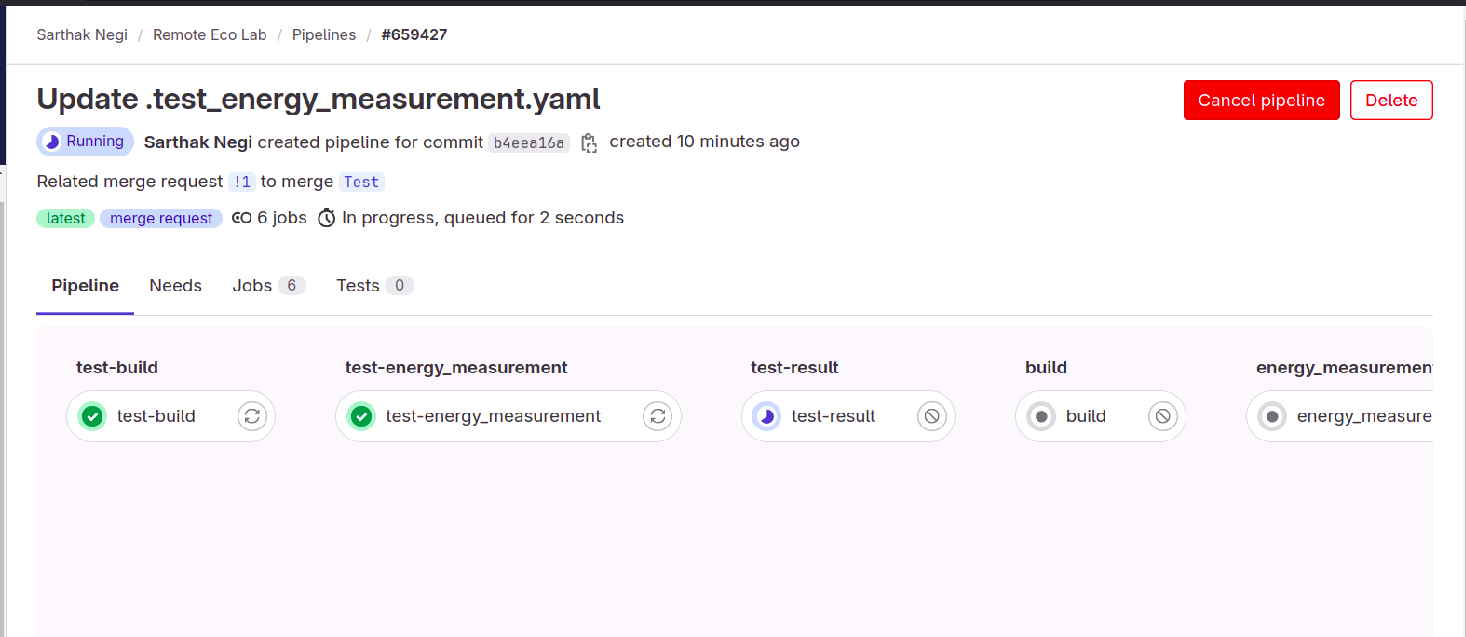 Figure : CI testing (image from Sarthak Negi published under a CC-BY-4.0 license).
We have existing test scripts used for Kate, KDE's text editor. We'll first see if these can be adapted for KEcoLab. If needed, we'll create new tests specifically designed for KEcoLab's functionalities.
Here's the coolest part: these tests will become part of our CI/CD pipeline. Whenever someone submits code changes (a merge request), the pipeline will automatically run the tests. If everything passes, the changes are merged with manual approval by the maintainers. But if a test fails, it'll be like a flashing red light, prompting us to fix the issue before merging.
The proposed dedicated test build approach using Kate test scripts is a valuable addition to the KEcoLab CI/CD pipeline. This enhanced testing strategy helps ensure that KEcoLab continues to deliver accurate and reliable software energy consumption measurements, ultimately leading to more efficient and eco-friendly code.
Interested in Contributing?By implementing dedicated CI-tests leveraging Kate's existing test scripts, we're taking a big step towards solidifying KEcoLab's stability and ensuring the accuracy of its software energy consumption measurements. This wouldn't be possible without the incredible support of the KDE community and my mentors @karan @joseph. Their dedication to open-source development is truly inspiring.
Want to See More? Head over to KEcoLab on invent.kde.org to explore the project, learn more about its development, and check out the merge request that sparked this advancement!
We're excited about this approach and would love to hear your thoughts! If you're interested in contributing to KEcoLab's development and helping make software development a more sustainable practice, you are always welcome. Together, we can make a real difference!
Qt for MCUs 2.5.3 LTS Released
Qt for MCUs 2.5.3 LTS (Long-Term Support) has been released and is available for download. As a patch release, Qt for MCUs 2.5.3 LTS provides bug fixes and other improvements, and maintains source compatibility with Qt for MCUs 2.5.x. It does not add any new functionality.

Recursive Instantiation with Qt Quick and JSON
Recently I was tasked to come up with an architecture for remote real time instantiation and updating of arbitrary QML components.
This entry shows how you can use a simple variation of the factory method pattern in QML for instantiating arbitrary components. I’ve split my findings into 3 blog entries, each one covering a slightly different topic. Part 1 focuses on the software design pattern used to dynamically instantiate components. Part 2 shows how to layout these dynamic components by incorporating QML’ s positioning and layout APIs. The last entry, consisting of Parts 3 and 4, addresses the anchors API and important safety aspects.
This is Part 1: Recursive Instantiation with Qt Quick and JSON.
The original factory method pattern made use of static methods to programmatically instantiate objects of different classes, instead of having to call their constructors. It achieved that by having the classes share a common ancestor. Our variation of the popular pattern uses a Loader to choose which component to load, and a Repeater to dynamically instantiate arbitrary instances of this loader using a model.
Here we specify which components with a JSON array and use a Repeater to load them.
id: root // A JSON representation of a QML layout: property var factoryModel: [ { "component": "Button", }, { "component": "Button", } ] // Root of our component factory Repeater { model: root.factoryModel delegate: loaderComp }To be able to instantiate any kind of item, you can use a Component with a Loader inside, as the Repeater’s delegate. This allows you to load a different component based on the Repeater’s model data.
// Root component of the factory and nodes Component { id: loaderComp Loader { id: instantiator required property var modelData sourceComponent: switch (modelData.component) { case "Button": return buttonComp; case "RowLayout": return rowLayoutComp; case "Item": default: return itemComp; } } }To assign values from the model to the component, add a method that gets called when the Loader’s onItemChanged event is triggered. I use this method to take care of anything that involves the component’s properties:
// Root component of the factory and nodes Component { id: loaderComp Loader { id: instantiator required property var modelData sourceComponent: switch (modelData.component) { case "Button": return buttonComp; case "RowLayout": return rowLayoutComp; case "Item": default: return itemComp; } onItemChanged: { // Pass children (see explanation below) if (typeof(modelData.children) === "object") item.model = modelData.children; // Button properties switch (modelData.component) { case "Button": // If the model contains certain value, we may assign it: if (typeof(modelData.text) !== "undefined") item.text = modelData.text; break; } // Item properties // Since Item is the parent of all repeatable, we don't need to check // if the component supports Item properties before we assign them: if (typeof(modelData.x) !== "undefined") loaderComp.x = Number(modelData.x); if (typeof(modelData.y) !== "undefined") loaderComp.y = Number(modelData.y); // ... } } }Examples of components that loaderComp could load are defined below. To enable recursion, these components must contain a Repeater that instantiates children components, with loaderComp set as the delegate:
Component { id: itemComp Item { property alias children: itemRepeater.model children: Repeater { id: itemRepeater delegate: loaderComp } } } Component { id: buttonComp Button { property alias children: itemRepeater.model children: Repeater { id: itemRepeater delegate: loaderComp } } } Component { id: rowLayoutComp RowLayout { property alias children: itemRepeater.model children: Repeater { id: itemRepeater delegate: loaderComp } } }The Repeater inside of the components allows us to instantiate components recursively, by having a branch or more of children components in the model, like so:
// This model lays out buttons vertically property var factoryModel: [ { "component": "RowLayout", "children": [ { "component": "Button", "text": "Button 1" }, { "component": "Button", "text": "Button 2" } ] } ]Here we’ve seen how we can use a Repeater, a JSON model, a Loader delegate, and simple recursive definition to instantiate arbitrary QML objects from a JSON description. In my next entry I will focus on how you can lay out these arbitrarily instantiated objects on your screen.
Thanks to Kevin Krammer and Jan Marker whose insights helped improve the code you’ve seen here.
I hope you’ve found this useful! Part 2 may be found already or later by following this link.
Reference- To see a real world application of this factory design pattern in action, watch “QML for building beautiful desktop apps | Dev/Des 2021”, by Prashanth N. Udupa https://www.youtube.com/watch?v=l2nC-onPGQs
If you like this article and want to read similar material, consider subscribing via our RSS feed.
Subscribe to KDAB TV for similar informative short video content.
KDAB provides market leading software consulting and development services and training in Qt, C++ and 3D/OpenGL. Contact us.
The post Recursive Instantiation with Qt Quick and JSON appeared first on KDAB.
How Selenium Helps Build Sustainable Software (And More)
 Figure : Logo of the KDE Eco initiative. (Image from KDE published under a CC-BY-SA-4.0 license. Design by Lana Lutz.)
In a general sense, sustainability refers to "the ability to maintain or support a process continuously over time". But what does it mean in terms of software?
With a rise in new technologies over the past half a century, the energy consumption of digital technology has greatly increased as well. Take, for example, large LLM models and cryptocurrency technology: both of these have heavy energy requirements. Software directly or indirectly consumes natural resources. The way software is written has a significant influence on resource consumption, such as with software-induced hardware obsolescence, when hardware vendors drive sales of new hardware through software updates that are incompatible with older hardware. The result is electronic waste and the unnecessary consumption of resources and energy in producing and transporting new hardware.
Sustainability in software means minimizing this waste. How? By designing software to limit energy consumption and have a smaller environmental impact. For this, we need tools to measure how much energy our software — and the hardware which runs it — needs. Without measurements, we cannot compare and we cannot improve!
KDE Eco has been working on KEcoLab, a project from Karanjot Singh to make KDE's measurement laboratory accessible to contributors from all over the world. KEcoLab needed a tool to easily playback usage scenarios for energy consumption data, and this is exactly what Selenium does by running automatic functional testing! But that's not all. Selenium also helps achieve the "KDE For All" goal by enabling accessibility improvements for everyone. It helps achieve the "Automate & Systematize Internal Processes" goal by creating functional tests to ensure the high quality of new code. In this way, Selenium helps achieve all three of KDE's goals!
Writing Tests In SeleniumSelenium AT-SPI is a Selenium-based tool used in KDE for automated tests of GUI applications. It works by identifying accessibility elements for a particular action. To know more about how Selenium AT-SPI functions internally, you can check out this blog post.
Writing a Selenium test is comprised of the following steps:
- Identifying QML elements where the action needs to be performed.
- Add accessibility code to QML elements. Accessibility code is basically a locator which will help Selenium identify that element and interact with it.
- Get elements by its locator. Once we are done with the previous step, we can now access those elements.
- Perform events on the elements. Once we are able to access elements, we can write code to interact with them.
You can follow this guide to setup Selenium AT-SPI and start writing basic tests. You can also check out this blog post for an in-depth overview.
 Figure : Video "Selenium AT-SPI: How Selenium Helps Achieve KDE's Goals" (screenshot from Pradyot Ranjan published under a CC-BY-4.0 license).
This project was done under SoK'24 with these deliverables in mind:
- Improve the setup process of Selenium.
- Create video guides to introduce Selenium-based GUI testing to more KDE contributors.
I am achieving this by:
- Enhancing the Selenium setup guide. You can find the updated Setup and Getting Started guides here. It includes all of the latest packages and info about distro-specific packages and dependencies required to setup Selenium. I've also updated the Writing Tests section to account for deprecated function arguments.
- Creating slides and videos. I have created video presentations for newcomers to Selenium so that it is a smooth transition. For this I'm using KDE's Kdenlive software for video editing. Once the videos are published online, I will update this blog post with links. The videos broadly cover these topics:
-
An intro video about what Selenium is and how it is useful in achieving KDE's goals.
-
Setting up Selenium.
-
Using the accerciser utility to discover accessibility elements.
-
Writing accessibility code and tests to show how to access elements.
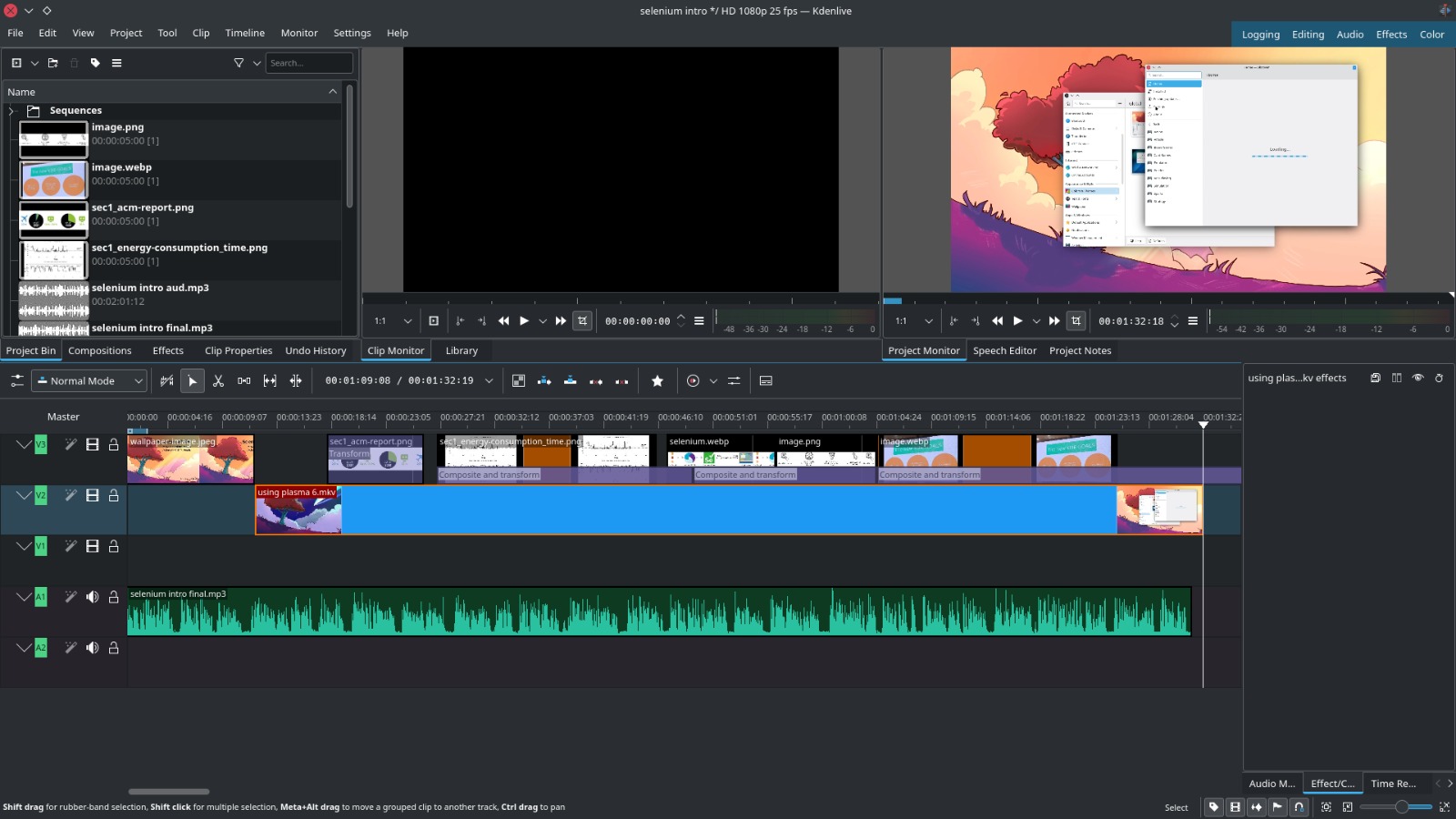 Figure : Using Kdenlive to edit the Selenium videos (screenshot from Pradyot Ranjan published under a CC-BY-4.0 license).
Some challenges that I faced were:
- Updating the setup guide so it is relevant with the latest changes. Selenium-AT-SPI is a moving target with a lot of internal changes and developements. Tracking down distro specific packages and making a list of deprecated/missing dependencies was time-consuming. The latest version of the setup guide can be found here.
- Making videos for using Selenium. With no prior experience, this was a challenge for me. I am proud to have done it!
As we move ahead, we have some plans for this project. Some of them are:
- We will be creating support rooms in Matrix to provide further support for KDE developers.
- We will use Selenium to adapt usage scenario scripts originally written with xdotool so we can compare the energy profiles of the emulation tools themselves.
If you are interested in contributing to Selenium-AT-SPI, you can join the Matrix channels KDE Energy Efficiency and Automation & Systematization Goal and introduce yourself. Selenium-AT-SPI is hosted here. Thank you to Emmanuel, Rishi, Nitin, and Joseph as well as the whole KDE e.V. and the wonderful KDE community for supporting this project and for all the help along the way. You can also reach out to me via email or on Matrix: @pradyotranjan:gitter.im.
KDE Gear 24.02.2
Over 180 individual programs plus dozens of programmer libraries and feature plugins are released simultaneously as part of KDE Gear.
Today they all get new bugfix source releases with updated translations, including:
- kcachegrind: Fix crash when opening history menu (Commit, fixes bug #483973)
- gwenview: No longer inhibit suspend when viewing an image (Commit, fixes bug #481481)
- elisa: Fix broken volume slider with Qt Multimedia backend (Commit, fixes bug #392501)
Distro and app store packagers should update their application packages.
- 24.02 release notes for information on tarballs and known issues.
- Package download wiki page
- 24.02.2 source info page
- 24.02.2 full changelog
The Sour Taste of Entitlement
Celebrating Creativity: Announcing the Winners of the Kubuntu Contests!
We are thrilled to announce the winners of the Kubuntu Brand Graphic Design contest and the Wallpaper Contest! These competitions brought out the best in creativity, innovation, and passion from the Kubuntu community, and we couldn’t be more pleased with the results.

Kubuntu Brand Graphic Design Contest Winners
The Kubuntu Council is excited to reveal that after much deliberation and awe at the sheer talent on display, the winner
of the Kubuntu Brand Graphic Design contest is Fabio Maricato! Fabio’s entry captivated us with its innovative
approach and deep understanding of the Kubuntu brand essence. Coming in a close second is Desodi, whose creative flair and original design impressed us all. In third place, we have John Tolorunlojo, whose submission showcased exceptional creativity and skill.
Wallpaper Contest Honours
For the Wallpaper Contest, we had the pleasure of selecting three outstanding entries that will grace the screens of Kubuntu 24.04 LTS users worldwide. Congratulations to Gregorio, Dilip, and Jack Sharp for their stunning wallpaper contributions. Each design brings a unique flavor to the Kubuntu desktop experience, embodying the spirit of our community.
A Heartfelt Thank You
We extend our deepest gratitude to every participant who shared their artistry and vision with us. The number and quality of the submissions were truly beyond our expectations, reflecting the vibrant and creative spirit of the Kubuntu community. It’s your passion and engagement that make Kubuntu not just a powerful operating system, but a canvas for creativity.
Looking Ahead
The Kubuntu Council is thrilled with the success of these contests, and we are already looking forward to future opportunities to showcase the talents within our community. We believe that these winning designs not only celebrate the individuals behind them but also symbolise the collective creativity and innovation that Kubuntu stands for.
Stay tuned for the official inclusion of the winning wallpaper designs in Kubuntu 24.04 LTS, and keep an eye on our website for future contests and community events.
Once again, congratulations to our winners and a massive thank you to all who participated. Your contributions continue to shape and enrich the Kubuntu experience for users around the globe.
Celebrate with Us!
Check out our special banner commemorating the announcement and join us in celebrating the creativity and dedication of our winners and participants alike. Your efforts have truly made this contest a memorable one.
Here’s to many more years of innovation, creativity, and community in the world of Kubuntu.
The results of our contest, our proudly displayed in our Github Repository
Cheers!
February/March in KDE Itinerary
It has been two exciting months since the last update on KDE Itinerary again, with new vehicle and train coach amenity information, DST changes in the timeline, progress on indoor routing and most notably the founding of the Transitous project.
New Features Train and coach amenity informationThe library we use for public transport data now has a much more elaborate data model for vehicle features. That’s general comfort feature like air conditioning or Wi-Fi but also things specifically relevant when traveling with small children, a bike or a wheelchair. These can also be qualified by availability (e.g. if those need a special reservation) and can be marked as disrupted.
Itinerary makes use of this in the train coach layout view, where it’s now possible to tap on a coach for a more detailed description.
 Coach feature details in Itinerary's train coach layout view.
Another place where this is used is anything showing results from journey or departure searches, such as when planning a new train trip. While all routing services provide some of this information, the level of detail can vary greatly though.
 Vehicle features in journey search results.
Since this is now available in a machine-readable form, it also becomes conceivable to allow configuring more detailed traveler profiles so Itinerary can show the information most relevant to you more prominently, or take this into consideration e.g. when automatically selecting transfer suggestions.
Daylight saving time informationSwitching to and from daylight saving time happens at different times in different locations (if at all), therefore Itinerary now also displays an information for upcoming daylight saving time changes in the timeline, similar as it already does for e.g. timezone changes.
 Daylight saving time information in Itinerary's timeline.
Infrastructure Work
Transitous
Daylight saving time information in Itinerary's timeline.
Infrastructure Work
Transitous
The probably most significant development on the infrastructure side is the appearance of Transitous. That’s a project which started at FOSDEM 2024 barely two months ago with the aim of setting up a community-run free and open public transport routing service. It has been growing rapidly and is meanwhile a collaboration from people from many different FOSS and Open Data projects and communities.
 Current Transitous coverage for long-distance travel in Europe.
While not even having all the basic features completed yet, it nevertheless already provides value by covering a few countries where we didn’t have any public transport data at all before. Starting with 24.05 KPublicTransport will have support for Transitous enabled by default, and thus it will also become available in Itinerary and KTrip.
Unlike with vendor-operated or otherwise proprietary services it’s now possible to expand public transport data coverage ourselves, assuming publicly available GTFS feeds at least.
Indoor routingWork on indoor routing for our train station, airport or event venue maps also continued, with the focus on turning the previously shown demo that was able to find a path from A to B into something that does that reliably and matching human expectations, which is the bulk of the work here.
Examples of this include not taking “shortcuts” through paths you shouldn’t usually take (e.g. emergency exists, or walking through conference rooms/lecture halls as pictured below), but also ensuring robustness against imperfect or incomplete map data.
 Shortest path (left), preferring corridors (right).
Some of this also involves clarifying or extending the OSM data model, and onsite visits to inspect challenging locations.
Fixes & Improvements Travel document extractor- New or improved travel document extractors for AMSBus, ANA, Deutsche Bahn, Eckerö Line, Elron, European Sleeper, Eurostar, Eventim, Finnair, Flibco, Leo Express, LTG Link, Moongate, National Express, Pasažieru vilciens, Salzbergwerk, SNCF, Thalys, ti.to, Trenitalia and UK national railways.
- Added support for yet another variant of PDF raster images for barcode detection.
- Improved generic extractors for flight boarding passes as well as ERA FCB and VDV train tickets.
- Fixed the schema.org semantic annotations in the OSM event calendar.
- Consider GIF files as well when searching for barcodes.
All of this has been made possible thanks to your travel document donations!
Public transport data- Fixed Deutsche Bahn Hafas searches sometimes not including replacement trains.
- Fixed misdetected train coach types from UIC coach numbers.
- Updated coverage metadata from the Transport API Repository.
- Fixed caching of location queries and negative journey query results.
- Improved support for arrival query result paging.
- Updated support for ÖBB coach layout data.
- Fixed train coach layout queries using times in the wrong timezone.
- Fixed barcode scanning on Android, caused by a regression in Qt 6.6.2 (affects all KDE apps, not just Itinerary).
- Prevent overly large Apple Wallet pass footer images from messing up the layout.
- Fix editing of times in AM/PM format.
- Remember the last used folder in trip group export file dialogs.
- Suggest meaningful file names for exporting trip groups.
- Allow to copy the program membership number on reservation pages as well.
- Added enough space at the end of the journey details view so floating buttons don’t overlap relevant content.
- Added floating button to timeline page to navigate to the current element and for manually adding entries.
- Fixed current ticket selection for elements without known arrival times.
- Fixed retaining journey notes/vehicle layouts when getting partial trip updates.
- Fixed displaying of departure notes for train trips.
- Fixed displaying of public transport departure disruptions.
Feedback and travel document samples are very much welcome, as are all other forms of contributions. Feel free to join us in the KDE Itinerary Matrix channel.
This week in KDE: real modifier-only shortcuts and cropping in Spectacle
For years KWin has offered modifier-only shortcut handling via an obscure and undocumented method of editing the kwinrc file. Well, no more: in Plasma 6.1, KDE’s shortcut choosers will accept lone modifier keys natively! This makes it much easier to, for example, re-bind what the Meta key does: now you can easily make it open Overview, KRunner, or anything else simply by assigning it directly to that something else. This work required extensive re-plumbing throughout KDE’s software stack and was undertaken by Yifan Zhu, closing multiple Bugzilla tickets in the process—some fairly old. Thanks a lot, Yifan! (Link 1, link 2, link 3, link 4, link 5, and link 6)
But that’s not all! Though bug-fixing is eternal, we’ve largely gotten over the hump for Plasma 6.0, and I’ve noticed that features and UI improvement have occupied more of people’s attention recently. So let’s start with a much-requested one…
New FeaturesSpectacle regains a Crop tool, this time integrated internally rather than coming from a 3rd-party annotations library. This also happens to fix a related bug (Noah Davis, Spectacle 24.05. Link 1 and link 2):

For laptops with RGB-backlit keyboards, Plasma has gained the ability to keep the backlight color in sync with the active accent color! And support for custom colors is coming too (Natalie Clarius, Plasma 6.1. Link 1 and link 2):
The new automatic crash reporter now gives you the option to let it always download debug symbols in the background to improve the crash reports it generates (Harald Sitter, Plasma 6.1. Link)
Going along with the theme of modifier-only shortcuts, you can now make an unused mouse button simulate pressing a modifier key alone (David Redondo, Plasma 6.1. Link)
Even though Snaps are supposed to auto-update, Discover has gained the ability to let you manually update them if desired (Kevin Ottens, Plasma 6.1. Link)
UI ImprovementsDolphin now shows a visible error message when you use a keyboard shortcut to trigger an action that can’t be performed in the current context, like cutting a file in a read-only folder (Jin Liu, Dolphin 24.05. Link):

In Elisa, you can now switch between list and grid views as you see fit (Jack Hill, Elisa 24.05. Link):

In Elisa, you can now search for albums on the Tracks page (Karl Hoffman, Elisa 24.05. Link)
You can now select multiple wallpapers in Plasma’s “add new wallpaper” dialog (Sahil Arora, Plasma 6.0.4. Link)
Changed Breeze-themed radio buttons and checkboxes to use the “Button” color role as most other interactive UI elements already do, which not only improves visual consistency, but also fixes a visual glitch in QtQuick-based software where these UI elements would have the wrong color some of the time (Akseli Lahtinen, Frameworks 6.1 and Plasma 6.1. Link 1, link 2, and link 3)
List headers in Kickoff now use the standard list header style seen in QtQuick-based KDE apps, which also necessitated creating a version of that component suitable for Plasma, so expect to see it showing up in more places too (me: Nate Graham, Plasma 6.1. Link 1 and link 2):

The Plasma Digital Clock widget’s holiday list picker no longer elides long text; instead it wraps the text, since there’s plenty of space to show it in the long already-scrollable list (Ivan Tkachenko, Plasma 6.1. Link)
Bug FixesOkular no longer asks you for a password to open encrypted PDF documents where the encryption isn’t actually applied to simply opening them (Nicolas Fella, sponsored by TU Dresden, Okular 24.02.2. Link)
Fixed a set of related crashes in Plasma that appear to have been a subtle side effect of the recent fix to make apps in Kickoff’s favorite grid disappear immediately when uninstalled (Fushan Wen, Plasma 6.0.4. Link)
Fixed another case where Plasma could crash when you plugged in a new screen (Fushan Wen, Plasma 6.0.4. Link 1 and link 2)
Fixed a rare Plasma crash that could happen when clicking on certain System Tray icons (Fushan Wen, Plasma 6.0.4. Link)
Fixed a case where Spectacle could crash after ending a screen recording when using certain GPU hardware (Fabian Vogt, Plasma 6.0.4. Link)
Fixed bug that had broken the ability to log out within 60 seconds of logging in when using Plasma’s systemd-enabled startup process (Harald Sitter, Plasma 6.0.4. Link)
Fixed an issue that caused two-finger touchpad taps on the Task Manager to not open a context menu with certain, shall we say, “less than premium” touchpad hardware (Fushan Wen, Plasma 6.0.4. Link)
Contributed code hardening for four additional crashes picked up by KDE’s automatic crash reporting system, which as you can tell is proving quite useful! (Fushan Wen again; he’s just that amazing! Plasma 6.0.4. Link 1, link 2, link 3, and link 4)
Fixed the date information in the tooltips of various clock widgets not being localized correctly (Albert Astals Cid, Plasma 6.0.4. Link 1 and link 2)
Fixed a variety of additional weird issues with mouse cursors in video games on Wayland (Xaver Hugl, Plasma 6.1. Link 1 and link 2)
Fixed some visual glitches that could happen on Wayland when you resize certain types of window that open in a maximized state (Ser Freeman, Plasma 6.1. Link)
Other bug information of note:
- 2 Very high priority Plasma bugs (down from 4 last week). Current list of bugs
- 34 15-minute Plasma bugs (down from 35 last week). Current list of bugs
- 145 KDE bugs of all kinds fixed over the last week! Full list of bugs
Spectacle is now less likely to show up in its own screenshots when used outside of Plasma and KWin on X11 (Konstantin Kharlamov, Spectacle 24.02.2. Link)
By default, Partition manager now mounts volumes (other than / and /home) with the nofail flag so they don’t block boot-up when not available for some reason (Thomas Bertels, Partition Manager 24.05. Link)
Fixed a memory leak in Plasma’s Networks widget (Fushan Wen, Plasma 6.0.4. Link)
Custom QML layouts for lock screens in Global Themes are no longer honored, as this is too security-sensitive (Marco Martin, Plasma 6.1. Link 1, link 2, link 3, and link 4)
The Dialog Parent effect (the thing that makes windows get dimmed when a child dialog window is open) now works on Wayland (Carlos Garnacho and David Redondo, Plasma 6.1 with Qt 6.8. Link)
Did a major code-quality overhaul of the Plasma Digital Clock and Calendar widgets, which fixed a bunch of fragility, warnings, and some minor glitches, with more to come soon (Ivan Tkachenko, Plasma 6.1. Link)
Automation & SystematizationWrote a tutorial on how to publish your Android-compatible KDE app on the Google Play store (Ingo Klöcker, link)
…And Everything ElseThis blog only covers the tip of the iceberg! If you’re hungry for more, check out https://planet.kde.org, where you can find more news from other KDE contributors.
How You Can HelpKDE has become important in the world, and your time and labor have helped to bring it there! But as we grow, it’s going to be equally important that this stream of labor be made sustainable, which primarily means paying for it. Right now the vast majority of KDE runs on labor that KDE e.V. didn’t pay for, and that’s a problem. We’ve taken steps to change this with paid technical contractors—but those steps are small due to limited financial resources. If you’d like to help change that, consider donating today!
Otherwise, visit https://community.kde.org/Get_Involved to discover other ways to be part of a project that really matters. Each contributor makes a huge difference in KDE; you are not a number or a cog in a machine! You don’t have to already be a programmer, either. I wasn’t when I got started. Try it, you’ll like it! We don’t bite!
Qt Creator 13 - CMake Update
Here is a set of highlighted CMake features and fixes in Qt Creator 13. Have a look at the ChangeLog for all the CMake changes.

KDE: “Run a command” on notification trigger
KDE had a feature a lot of people didn’t know about. You could run a command when a notification triggered. The feature wasn’t very well documented and nobody really blogged about it.
However with the release of KDE Plasma 6, the feature was removed. I learned about it by accident, as it is tracked by Bug #481069. I really need the feature and I re-implemented it in KDE Plasma 6. I will be available in KDE Plasma 6.1 and KDE Frameworks 6.1.
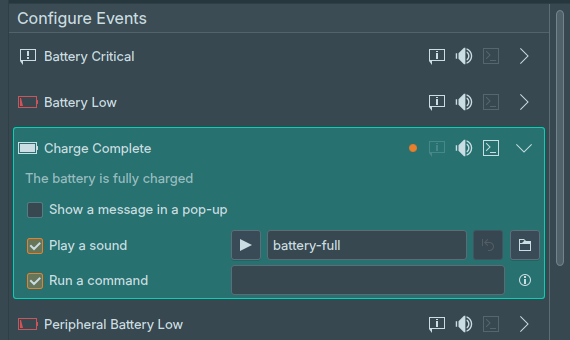 KDE: Run a command
I’m using the “Run a command” feature for calendar events. Normally you get a popup notification. The popup notification is small and pop up where all of them are shown. When I’m concentrated and working on some code I simply miss them. If I play a game, I miss them.
The solution for me is to use a Text to Speech (TTS) Engine. I’ve setup speech-dispatcher with piper-tts on my system. When an a reminder triggers it says: “Andreas, you have an appointment in 10 minutes: Samba Meeting”.
You can find the python script I use here.
Endless possibilitiesThe opportunities for doing cool stuff with this are endless. Here are some ideas what else you could do:
- Start your meeting/conferencing application prior to the meeting
- Change the desktop activity before a meeting
- Lock the screen if a specific WiFi gets disconnected
If you have some nice idea or already used it in the past, leave a comment to let me know what else you can do.
KStars 3.7.0 is Released
CI & CD Infrastructure

- Merge requests run the custom build and the CI builds
- Master runs the CI build (though there could be other things we run, such as CVE scans)
- Craft recipes are run from the last commit of the master or release branch, they require "build" and "build-and-test-stable" to be run manually beforehand.
- Publishing to Microsoft store is available after the Windows Craft is run.
A view is a collection of settings: the orientation of the sky map, how the orientation changes as the sky map is panned, whether it is mirrored or not, and optionally the field-of-view to set the map to.
If no views are defined, KStars introduces a set of standard / "demo" views by default. Existing views can be edited and new views can be added using the "Edit Views..." interface. They can also be re-ordered in the interface. The ordering of the views in the "Edit Views..." dialog defines the order in which views will be cycled through using the keyboard shortcuts Shift + Page Up and Shift + Page Down. Thus, you can set up the views for easily switching between naked eye / finder scope / telescope views for easy star-hopping.
The rotation feature overlay now also marks East in addition to north and zenith, so as to know easily whether the display is mirrored or not.
In Analyze, one can now move from one session to the next (forward or backward).
Keyboard shortcuts are provided for that.
Another set of keyboard shortcuts both advance and show the next image in the same FITS Viewer.
Thus, for example, one can advance through all the captured images of the evening, showing all the captures on the FITS Viewer by repeating a keyboard shortcut.
A useful complement to this might be adding the ability to delete bad captures, but for now that will have to wait for a rainy day.
Going along with the above, keyboard shortcuts have been added to move to the next or previous FITS Viewer tab, Also helpful to the above is a new command to zoom in/out all tabs (not just the current one).
There is a new Blink Directory menu command (in both menus, as above) which will open a single tab with a list of all the images below the directory selected (that is, both in that directory, and in directories below it). It initially displays the first image, but new commands work in that tab to switch to displaying the next (or previous) image file in the list. This could be used to blink hundreds of files.
Scheduler Refactor
- Target
- Sequence File

Size Policy for Qt Quick Controls
When using Qt Quick Layouts, it is necessary for the user to specify the attached properties Layout.fillWidth or Layout.fillHeight to stretch a child component. This process can become cumbersome as more components require it. Inline components may serve as an alternative, but they may not be as effective when dealing with different component types. To tackle these challenges, the size policy feature has been introduced in Qt Quick Controls in version 6.7 (under tech preview), mirroring similar functionality found in widgets.
